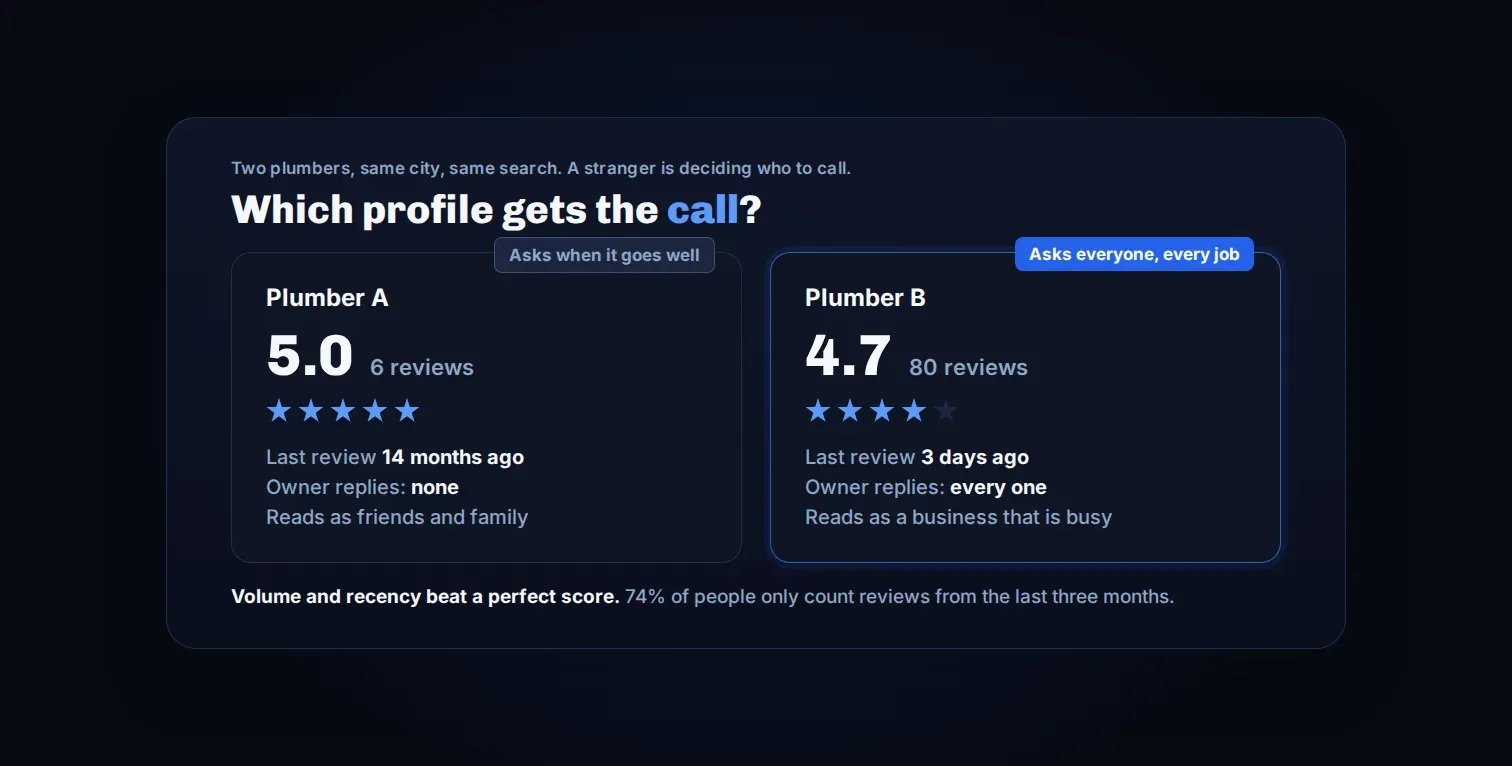
Ask every customer, every time, a few hours after the job is done, with the review link in the same message. That is the whole method. Almost nobody does it, because the way most shops get reviews is remembering to ask, sometimes, when a job went unusually well.
That produces a handful of reviews from your happiest customers over several years while the business does hundreds of jobs. This post covers why that gap matters, why the common shortcut of filtering out unhappy customers is a risk to your profile, and how to ask everyone without a bad job turning into a bad review.
Why a stranger reads your reviews before anything else
Reviews are the one thing a person checks before calling a business they have never used. They aren't reading your About page. They are looking at the number next to the stars, how recent the last one is, and whether anybody at the shop replied.
Three figures we keep on hand for this:
- 74% of consumers look for reviews written in the last three months. Older ones carry less weight. A shop with sixty reviews and nothing since last spring is not showing them what they are looking for.
- 85% of consumers are more likely to use a business after reading positive reviews. Not a small lift.
- 83% of customers go on to leave a review when they are asked. Most people will do it. The problem is that they aren't being asked.
The third number is the one that matters. If most customers leave a review when asked, and most shops don't ask, the shops that build the asking habit pull ahead on the one thing strangers actually check.
Why "ask when it goes well" fails
An auto shop does twenty jobs in a week. Two of them go so well the customer says something at the counter, and one of those two gets asked for a review. The other eighteen customers were satisfied, paid, and left. Nobody asked them for anything.
That isn't a work ethic problem. Asking feels awkward, the counter is busy, and by the time anyone remembers, the customer is gone. The result is a review count that grows by a few a year while the job count grows by hundreds.
The fix isn't to try harder to remember. It is to take remembering out of it.
The shortcut that can get your profile penalized
Plenty of review software solves the awkwardness by asking how the job went first, then only sending the review link to the people who answered well. It gets marketed as five stars every time.
Google's review policy prohibits soliciting reviews selectively, and a business caught doing it can have its reviews stripped or its profile penalized. The account that takes the hit is yours, not the vendor's who built the funnel.
There is a second problem, and it is the one that costs jobs. A profile with eighty reviews at 4.7 gets called more than one with six at 5.0, because the second one looks like friends and family. A perfect score with no volume doesn't read as trustworthy. It reads as curated.
The rule we hold to: a satisfaction answer can only ever add an action. It can't remove one, delay one, or make one conditional. Everyone gets asked, everyone gets the link, and the link is in the first message alongside the question rather than after it.
What the message looks like
Short, from the person who did the work, and it names the job.
Hi [First Name], this is [Your Name] at [Business Name]. How did the brake job go? If we earned it, a review helps a lot: [Google review link]
Three things that make this work:
- It names the job. "The brake job" tells the customer this came from the shop that did the work, not a review-request tool.
- It asks a real question. "How did it go" turns the message into a signal about how the job actually went, not just a request for a rating.
- The link is already there. No branch where a customer never receives it.
Timing matters too. A request that arrives while the car is still being pulled around reads as pressure. A few hours later they have driven it, formed an opinion, and are sitting down.
What happens when the answer is bad
This is the part that makes asking everyone safe, and it is the part most review tools skip.
If the customer says the job went badly, the link is already in their hand and they can use it. Nothing is taken away. What additionally happens is you get an internal alert, straight away, with the customer, the job, and what they actually said.
Concern flagged. [First Name], brake job, Tuesday. "Still pulling to the left and nobody called me back."
You call, you fix it, you close it out. After it is resolved, a second ask goes out. That second ask is the one thing an unhappy answer adds, and it lands on top of the request they already got, not instead of it.
A bad job gets a phone call before it gets a review. That is the entire point of the recovery branch. It doesn't stop a bad review from ever happening. It stops the ones that were fixable.
How it runs automatically
Our review requests tool fires off one thing: marking the job finished. When the job is closed out or the invoice goes paid, the request queues and sends a few hours later, same day, by text and by email. If the number is bad, the email still lands.
One dependency worth saying out loud: if jobs never get marked finished, nothing sends. That habit is the one behavior change this asks for, and it takes about four seconds per job.
The questions owners ask before turning it on:
- Silence gets exactly one reminder and nothing more.
- Once someone has reviewed you, they never get asked again. Repeat customers get one ask a year, however many jobs they book.
- A bad review stays up, exactly as posted. Nobody here contacts Google to remove one, and any service that offers to is selling something that doesn't exist.
- Only real customers on real closed jobs get asked. There is no list to buy and nothing to seed.
- Responding to reviews stays yours to do, and it is worth doing.
- Google is the default destination, because that is where the people deciding whether to call you are looking.
- Email requests run from day one. The text half starts once carrier registration clears, which isn't ours to speed up.
Check your own business this week
- Open your Google profile and look at the date on your most recent review. If it is more than three months old, most people reading it don't count anything you have.
- Count the jobs you closed last month. Then count the reviews you got. The gap is the number of customers who would probably have said yes.
- Look at the three shops ranking above you and compare review count, how recent, and whether anyone replies.
- If you are using review software now, find out whether it sends the link to everyone or only to the people who answered well. If it filters, that is a risk to your profile, not a feature.
We run this exact comparison as part of the free teardown. We pull your Google profile against the three competitors ranking above you, including review counts, how recent they are, and whether anyone is replying. It runs on public information, nothing is requested from you, and it is delivered on a call.